Archive for category World Wide Web

Why Google AppEngine still sucks

Last June, when I built the Twitter Trending Topics app using Google AppEngine, I had mentioned quite a few issues with the application building in Google AppEngine. After giving it about 9 months to mature, I thought I will take a look at it again with a fresh perspective on where it stands.

The first thing that I wanted to try was to revive my old application. The application has been inactive because it has surpassed the total stored data quota and I never managed to find time to revive it.

One of the biggest issues that I mentioned last time, was the ability to not be able to delete data from the application easily. There is an upper limit of 1GB on the total stored data. Considering that the data is schema-less (which means that you need more space to store the same data when compared to Relational Databases), this upper limit is severely restrictive when compared to the other quota limits that are imposed. There were about 800,000 entries of a single kind (equivalent of tables) that I had to delete!

So I started looking for ways to delete all the data available and came across this post. I decided to go with the approach mentioned here. The approach still seems to be to delete data in chunks and there is no simple way out. The maximum number of entries allowed in a fetch call is 500, which means I require 1600 calls to delete all the data.

Anyway, so I wrote a simple script as mentioned in the post above and executed it. I experimented with various chunk values and saw that 300 was the size that worked optimally; anything more either seemed to take a lot of time or actually timed out.

Here is the code that I executed:


from google.appengine.ext import db
from <store> import <kind>


def delete_all():
   i = 0
   while True:
      db.delete(<kind>.all().fetch(300))
   i = i + 1
   print i

saved this file as purger.py and executed it as:

$ python appengine_console.py twitter-trending-topics
App Engine interactive console for twitter-trending-topics
>>> import purger
>>> purger.delete_all()

A seemingly simple script, but after about a couple of hours of execution (after having deleted roughly 200,000 entries), I started seeing a 503 Service Unavailable exception. I thought this was to do with some network issues, but realized soon that this was not the case. I had run out of my CPU time quota!

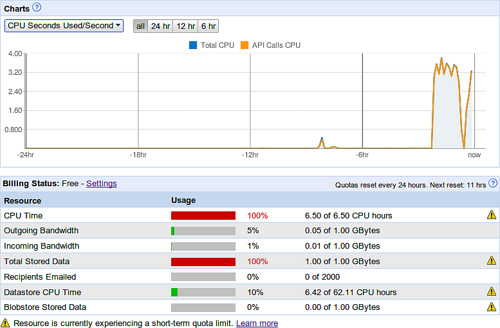
To delete 200,000 entries the engine had taken up 6.5 CPU hours and this it managed to do in less than 2 hours! It had, according to the graphs, assigned 4 CPU cores to the task and executed my task in the 2 hours. At this rate, it will take me 4 days to just delete the data from my application. The Datastore CPU time quota is 62.11 hours but there is an upper cap of 6.5 hours on Total CPU time quota – the Datastore CPU Time quota is not considered separate. I am not sure how this works!
Google AppEngine - Quotas

As seen in the screenshot above, the script executed for about 2 hours before running out of CPU. There was no other appreciable CPU usage in the last 24 hours. Considering that there was no other task taking up CPU, the 6.42 hours of Datastore CPU time seems to be included in the 6.5 hours of Total CPU time. So how am I supposed to utilize the rest of the 55 hours of Datastore CPU time?

I am not sure if I am doing something wrong but considering that there are no better ways of doing things here are my observations:

  • It is easy to get data into the system
  • It is not easy to query the data (there is an upper limit of 500 and considering that joins are done in code, this is severely restrictive).
  • There is a total storage limit of 1GB for the free account
  • It is not easy to purge entities – the simplest way to delete data is to delete them in chunks
  • Deleting data is highly CPU intensive – and you can run out of CPU quota fairly quickly.

So what kind of applications can we build that is neither IO intensive nor CPU intensive? What is Google’s strategy here? Am I missing something? Is anything wrong with my analysis?
, ,

No Comments

Google Reader – Mark Until Current As Read

I am an ardent feed consumer. I easily have over 300 feeds in my Google Reader and read them whenever I get a chance. The feeds include technology blogs, photography blogs, local news, startup blogs, blogs by famous people, blogs that help me in my projects etc.

It’s just not possible for me to visit every feed category every day, so I frequently see some of these categories overflow with posts.

Now I know there are extensive blog posts which describe how to better manage feeds and to cut down on information overload. But as we all know there is no simple solution.

So here I was using Google Reader and just skimming through the posts when I came across this need.

Suppose a feed has about 100 unread posts and I have skimmed through half of them, and read one in between that I thought was interesting, I am now left with quite a few posts on top of my read post, that I am not interested in reading but want to mark them as read so I don’t need to see them again. Would it be possible to mark these as read leaving the rest untouched?

The recent changes to Google Reader provide one option – Mark all entries older than a day, week or month as read. But this does not exactly serve the purpose.

I ended up hacking a Greasemonkey script to do exactly what I wanted.

Here is how the script behaves:

Just press Ctrl+Alt+Y and the script will mark all entries above the current read entry as ‘read’. Ctrl+Alt+I will mark all entries below the current entry as read – for people who read backwards. :)

Added benefits:

  • This also works with search results in Google Reader.
  • The script works with entire folders, so you can skim through all posts in a folder marking the ones you have skimmed as read.

How it works:
The script uses the css class names to determine which posts are unread above (or below) the current post. Once it obtains this list, it simulates a click on each of these posts and thereby marks them as read. Simple as that!

This script is part of the Better GReader extension and has featured in Lifehacker.

In order to install the Google Reader – Mark Until Current As Read script, visit this site.

, , , , ,

1 Comment

What I dislike about Google AppEngine

When I built the ‘Twitter Trending Topics‘ application, one of the things I had in mind was to see how quickly an application can be built in the most economical way.

While the application is working like a charm, a day into the launch, I already see a few issues with the hosting solution that I chose, the Google AppEngine.

Read the rest of this entry »

, ,

5 Comments

My weekend hack – Twitter Trending Topics

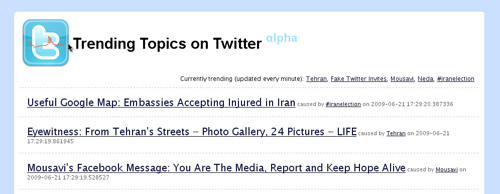
I got this idea of building an application which pulls all the pages mentioned in the trending topics on Twitter. Why would that be useful? Well, it’s the simplest replacement for Google News, but more real time and no tweet noise.


Twitter Trending Topics - Weekend hack

Here are the steps I followed to build this application:

  1. The first step was to use IPython and use the Twitter Search API to get the latest tweets.
  2. I then wrote the code to parse these tweets looking for URL’s in them.
  3. The next step was to get the content from these URL’s, and get the title of the pages.
  4. Next, I had to persist it in the store.
  5. Slap a front-end and allow navigation. At this point, the obvious choice for me was Google AppEngine, since it is the cheapest hosting alternative available. I had to make some changes to the application to accommodate it to Google AppEngine’s requirements, but they were mostly trivial.
  6. Build the styles, the icons, the pretty URL’s and you are done!

The initial setup of the application was done in less than 2 hours time!

You can access the application here: Twitter Trending Topics.

There are a few known bugs, but the overall results are impressive.

, , , , ,

No Comments

Experiment with Delicious and Python

Once in a while, I look at my Delicious bookmarks to get an idea of what I have been upto in recent time. The ‘Current Interests‘ tool was written with exactly that in mind.

I began to wonder if my bookmarks can give me an idea of trends in technology and my interest in them. So I quickly wrote a Python script to give me the top tags in each year and here are the results.

Read the rest of this entry »

, , , ,

No Comments

Optimizing website bandwidth consumption

Since the time I have hosted this blog on WordPress, I am looking for patterns and tweaks to optimize my bandwidth consumption. Most hosting providers charge you for your bandwidth, so it is always a good idea to see where you can cut down on bandwidth consumption.

When I say optimize I don’t mean reducing size unnecessarily. A good theme with good content in it is definitely going to add to the user experience of visitors to your site and that shouldn’t come in the way of bandwidth optimization. A lot of these points are closely related to the SEO of your site.

So here are some things you can do to optimize the bandwidth.

Read the rest of this entry »

, , , , , , , , , , , ,

1 Comment

Why it is the way it is – Hypertext Design Issues

This post is an analysis of an early document on Hypertext Design Issues.

The key ideas being discussed in this document are on Hypertext – whether links should be monodirectional or bidirectional, should links be typed etc.

These discussions were conducted in the early days of the web. It is interesting to know how things have evolved since the time this design was made.

Let’s first get some facts right:
Hypertext links today:

  • Are Two-ended
  • Are Monodirectional
  • Have one link
  • Are Untyped
  • Contain no ancillary information
  • Don’t have preview information

What are the implications of this design?

  • Hyperlinks are not multiended. A single link cannot link to multiple destinations. There are however cases when one to many, many to one and many to many ‘links’ might make sense. These types of connections among information nodes is what RDF/OWL help achieve.
  • an advantage is that often, when a link is made between two nodes, it is made in one direction in the mind of its author, but another reader may be more interested in the reverse link.
    Bloggers want to track those pages that have linked to their posts. Google indexes allow us to track links to a particular page. Linkback mechanisms have evolved in the Blogger world to serve precisely this purpose. In general however, we never know who has linked to our page
  • It may be useful to have bidirectional links from the point of view of managing data. For example: if a document is destroyed or moved, one is aware of what dangling links will be created, and can possibly fix them.
    This problem has not yet been solved. Since links are monodirectional, dangling links cannot be detected. Dangling links – when the information linked to changes, there is no way to clean up the links
  • About anchors having one or more links: This is still debatable. There are some utilities that allow you to make every word a hyperlink and allow executing a host of ‘commands’ on the word. Ex: Perform a Google search for the word, lookup the word in dictionary.com, map the word (if it is a city) or lookup in Wikipedia. However I am not a big fan of these utilities since I feel it clutters the screen and the context detection is not yet great.
  • Typed links: I feel this is the single most important thing missing from Hyperlinks in WWW. While making types mandatory would have complicated the issue, a standard way to provide ‘types’ to links should have been provided. Anyway, it’s the way it is. So how are people solving this issue? Microformats, RDFa are 2 things I know of. The data is mostly silently read by the browser and tools and users are usually unaware of this data in the pages. In other words, the User Interface for typed links is still not great.
  • Meta information associated with links. Interesting! I am aware of Wikipedia articles containing the date when the page was last visited but this is pretty much manually updated as far as I know.
  • Preview information: Snap solves this very issue.

The conclusion?
Well, it’s tough to say how optimal the design of hypertext on the WWW was. Introducing multi-directional links and typed links would definitely help the technical people out there, but would introduce complexity which would perhaps have made it so tough for the web to flourish that it wouldn’t be what it is today.

, , , , , ,

No Comments

Google search making use of Social Graph information???

Today, while I was searching for my name in Google, I saw that towards the end, it showed my Delicious bookmarks in the search results. There is definitely no occurrence of my name in the pages that were listed in the search results and the only connection I could see between ‘me’ and the search result is that I have bookmarked these links in Delicious.

Is Google making use of the Social Graph information that I provided while I was trying out Google Friendconnect? Doesn’t this raise privacy concerns?

, ,

No Comments

Why it is the way it is – an analysis of the proposal by TimBL of the WWW

Ever wonder why hyperlinks in the World Wide Web (WWW) are unidirectional? Why are links not typed? Why are links many to one and not many to many? Why do browsers have the restrictions that they have today? Why is the web the way it is?

A lot of the answers to these questions are hidden somewhere deep in the web itself. Having come across several technical issues with the web, I began to wonder what the initial creators of the web perceived the web to be? What was running in the minds of the users when they came across the idea of the web?

I started tracing back into history to the very beginning of the WWW. That’s how I came across the ‘original proposal of the WWW‘.

So here are some of my notes on the paper:
(Content in italic are from the paper.)

Use cases for the WWW

The initial use-cases for the WWW were related to project management – communicating project ideas, storing technical details for retrieval later, finding out who wrote a piece of code, fetching all related documents for the current task. Most of the proposal revolves around the system to allow for multiuser hypertext access which is non-centralized and non-hierarchical.

Relationship to relational databases

Linked information systems have entities and relationships. There are, however, many differences between such a system and an “Entity Relationship” database system. For one thing, the information stored in a linked system is largely comment for human readers. For another, nodes do not have strict types which define exactly what relationships they may have. Nodes of similar type do not all have to be stored in the same place.

What does this mean?
We do have entities and relationships, but there are no fixed rules. Entities don’t need to have types and any two entities can be related to each other. There is also no restriction on where the entities are stored.

Hypertext

The key ideas around Hypertext were put down by Vanevar Bush in 1945 in the form of Memex. There were several attempts by people to implement Hypertext and also Hypermedia (linking images, video etc). Ted Nilson coined the word Hypertext in 1965 and subsequently also coined the term Hypermedia. The first implementation of Hypertext in some form seems to be from Doug Engelbart in 1968. The buzz around Hypertext picked up during the late 1980′s – there was a dedicated Usenet newsgroup, a bunch of conferences starting with Hypertext’87, several ACM papers, workshops etc. All this happened even before the WWW was born. There were several commercial products too, like Hypercard from Apple.

TimBL had also tried his hands at building a hypertext system, which he called Enquire. TimBL claims to have built it as early as 1980, although the first mention of Enquire seems to be in this proposal made in 1989.

When I started researching on Hypercard features, I realized one thing. These products are easily 20 years old. Technology has changed a lot in this time. It is really hard to imagine how many of these products looked like. Either the source is not available in its entirety or it is tough to compile. This reminds me of what Grady Booch said – about having an archive of source code similar to the archive of books, videos, music and web pages.

Anyway, the most important difference I see between Enquire and Hypercard is that Enquire was more of a ‘programmers playtool’, while Hypercard was targeted towards end-users.

So while Hypercard had ‘fancy graphics’, Enquire had typed links and was available for multi user access.

WWW requirements

About the requirements that TimBL put down for the WWW:
* Remote access across networks, Heterogeneity, Non-Centralisation – These are what are now taken for granted. The WWW is ubiquitous, it never breaks as a system, it can be accessed from just about any device that is Internet aware.
* Access to existing data – This was one of the reasons why the WWW became popular. It was easy to get existing data onto the web with minimal effort.
* Private links -
One must be able to add one’s own private links to and from public information. One must also be able to annotate links, as well as nodes, privately.
Frankly, I am not sure what TimBL means by private links ‘from’ public information.
* Bells and Whistles – Graphical access to the web was considered optional.
* Data analysis – This is one thing that has not taken off.
It is possible to search, for example, for anomalies such as undocumented software or divisions which contain no people. It is possible to generate lists of people or devices for other purposes, such as mailing lists of people to be informed of changes.
It is also possible to look at the topology of an organisation or a project, and draw conclusions about how it should be managed, and how it could evolve. This is particularly useful when the database becomes very large, and groups of projects, for example, so interwoven as to make it difficult to see the wood for the trees.

The Semantic Web is showing this promise.
* Live links – These are what are now called ‘Dynamic pages’ and most popular pages on the web are ‘live’ in that sense.

The implementation

Much of the academic research is into the human interface side of browsing through a complex information space. Problems addressed are those of making navigation easy, and avoiding a feeling of being “lost in hyperspace”. Whilst the results of the research are interesting, many users at CERN will be accessing the system using primitive terminals, and so advanced window styles are not so important for us now.

As I read this, it gives me a feeling that TimBL was not thinking of making the WWW a ‘public’ web that would be used by just about everyone. Even a non-techie could build a page of content and hook it onto the web. Usability seemed to be of least importance.

The only way in which sufficient flexibility can be incorporated is to separate the information storage software from the information display software, with a well defined interface between them.

This division also is important in order to allow the heterogeneity which is required at CERN (and would be a boon for the world in general).

A client/server split at this level also makes multi-access more easy, in that a single server process can service many clients, avoiding the problems of simultaneous access to one database by many different users.
‘information display software’ – Now that’s what the browser is! Also this is what created the need for HTTP, HTTP server and HTML.

Conclusion

Do we still visualize the web as just content linked via Hypertext? How can we accommodate social networking and the whole realm of developments around Web 2.0 and social network applications?

The web has surely come a long way!

(Note: Draft content – subject to change)

, , , , ,

No Comments

YQL – Yahoo’s query language for the web

This post is a part of the AfterThoughts series of posts.

Post: A query language for searching websites
Originally posted on: 2005-01-27

I blogged about the idea of a query language for websites back in 2005. Today, when I was doing my feed sweep, I came across YQL, a query language with SQL-like syntax from Yahoo that allows you to query for structured data from various Yahoo services.

There is one thing that I found interesting. The ability for you to query ‘any’ HTML page for data at a specific XPath. There are some details in the official Yahoo Developer blog.

The intent of YQL is not the same as what I had blogged about. While YQL allows you to get data from a specific page, what I had intended was something more generic – an ability for you to query a set of pages or the whole of the web for specific data, which is a tougher problem to solve.

In order to fetch specific data from a HTML page using YQL, all you have to do is:
1. Go to the page that you want to extract data from.
2. Open up Firebug and point to the data that you want to extract (using Inspect).
3. Right click the node in Firebug and click on ‘Copy XPath’.
4. Now create a query in YQL like this:
select * from html where url=” ” and xpath=”

Although the idea seems promising I wasn’t able to get it to work for most XPaths.

I guess the reason is the difference between the way the browser interprets the HTML and the way a server would interpret it. For example, if there is no ‘tbody’ tag in your table, the Firefox browser inserts a ‘tbody’ tag and that would be present in your XPath, while a server that interprets the HTML after Tidying it wouldn’t see one. One way we can solve this is to have the same engine interpret the XPath on the server side as well or be as lenient as possible when matching the XPaths. I had similar discussions with the research team in IRL when I was working on my idea of MySearch, which had similar issues, and there were some interesting solutions that we discussed.

I would say it is only a matter of time when someone will crack the issue of fetching structured data from semi-structured data present in the web and make it available to other services. Tools like Dapper, Yahoo Pipes, YubNub and YQL are just the beginning.

I have made several attempts at this right from using one of these tools, to building my own using Rhino, Jaxer etc, but until now the most content solution is a combination of curl, grep, awk and sed.

, , , , , , , , , , ,

No Comments

Rss Feed Tweeter button Facebook button Digg button Flickr button